
Correct edition and version matter
Select Java or Bedrock and match the Minecraft version you used to create the world. Terrain, biome, and structure rules can change between versions.
Free seed map tool
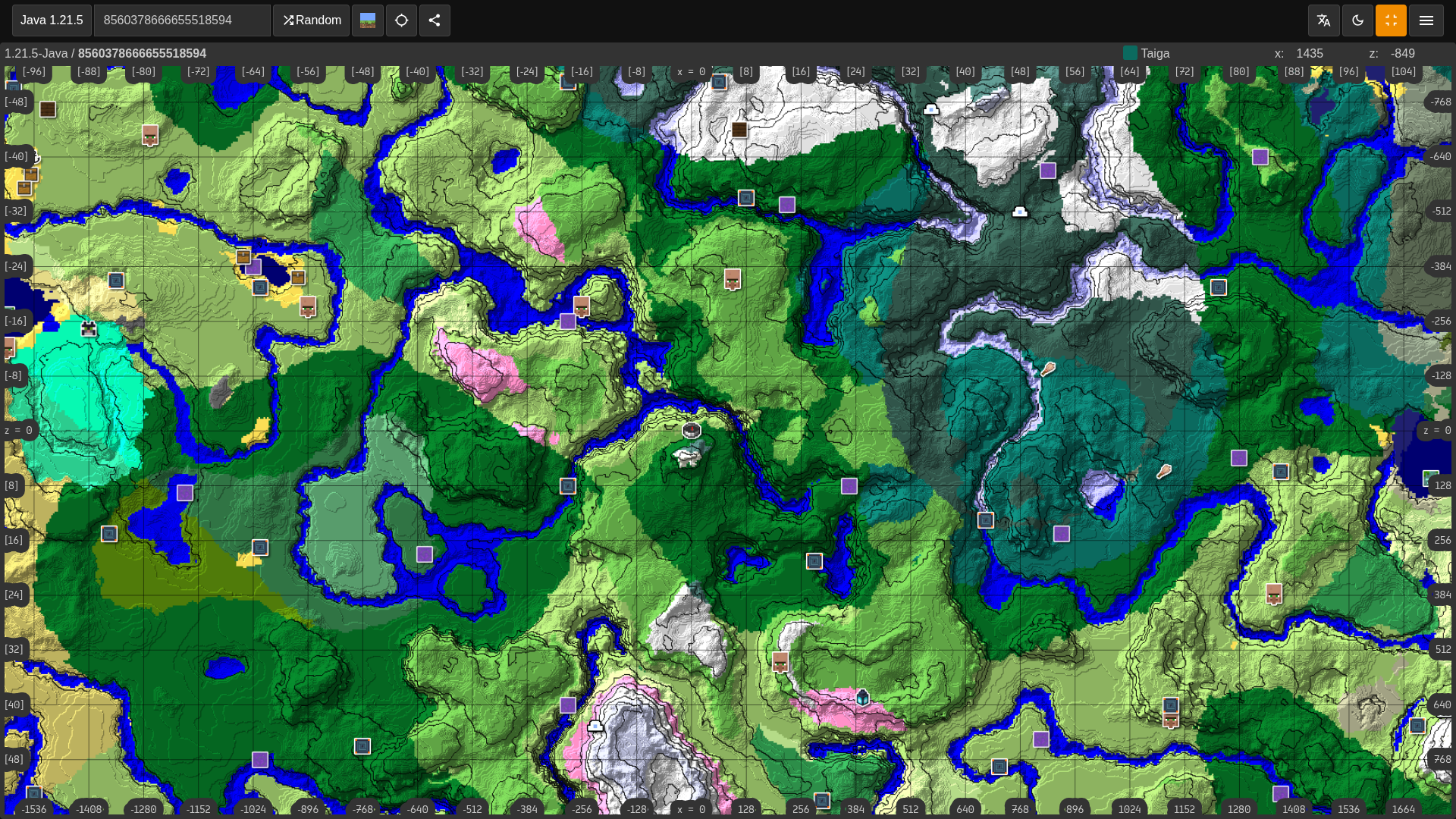
Enter any seed to find biomes, villages, strongholds, ancient cities, trial chambers, Nether routes, and End coordinates on an interactive Minecraft map.
Choose the edition and version that match your world.
Related finders
Use the main seed map as a Minecraft biome finder and structure finder, or jump into a focused page for the structure you need.
Minesite runs the map in your browser with a WebAssembly world-generation engine, so seed checks are fast and private.
Select Java or Bedrock and match the Minecraft version you used to create the world. Terrain, biome, and structure rules can change between versions.
Use X and Z coordinates to plan travel to villages, strongholds, ancient cities, monuments, mansions, portals, and other generated structures.
If your world was started on an older version, already-explored chunks keep their old terrain. Use the map for unexplored areas that match the selected version.
The viewer supports common Java and Bedrock versions, with Overworld, Nether, and End exploration from the same map interface.
Chunkbase and mcseedmap are useful references, but Minesite is built around a simpler seed workflow: browse a curated seed, open the same seed in the map, then use coordinates from the seed page and map together.
Check villages, ruined portals, caves, food routes, and safer base areas before you spend hours in a world that does not fit your playstyle.
Compare cherry groves, mountains, valleys, oceans, rivers, and flat build zones before committing to a large base or server spawn.
Inspect strongholds, Nether routes, villages, trial chambers, and End targets in one planning flow, then save the map URL for later testing.
The tool runs in your browser and does not require an account. Use it as a quick privacy-friendly seed check, then switch back to the seed library for screenshots, descriptions, related seeds, and copyable coordinates.
Find the seed in your world settings, use /seed on Java worlds where you have permission, or open your save's level.dat file in tools that support local imports.
Common Java save locations
Open the world folder, then look for level.dat.
| OS | Default saves path |
|---|---|
| Windows | %appdata%\.minecraft\saves\WorldName\ |
| macOS | ~/Library/Application Support/minecraft/saves/WorldName/ |
| Linux | ~/.minecraft/saves/WorldName/ |
For your own Java world, use the in-game /seed command if cheats or operator permissions are available. For Bedrock, check the world settings. For servers and Realms you do not own, ask the owner for the seed.
Short answers for the questions players ask before opening a Minecraft seed viewer.
A Minecraft seed map viewer turns a seed into an interactive map so you can inspect biomes, terrain, structures, and coordinates before exploring in-game.
Yes. Choose Java or Bedrock before opening the map so the viewer uses the matching world-generation rules for your seed.
Yes. The map can show major generated structures including villages, strongholds, ancient cities, trial chambers, monuments, mansions, portals, fortresses, and end cities.
The most common causes are a mistyped seed, the wrong edition or version, or a world that was partly generated in an older Minecraft version.
No. Minesite runs in your browser. Enter a seed, choose an edition and version, and open the map without installing an app or creating an account.
Finder Guide
A seed map viewer turns a seed into a route plan. Use it to inspect biomes, structures, spawn areas, coordinates, and dimension travel before you commit to a world, publish a seed page, or send coordinates to friends.
Start by entering the exact seed, edition, and version. Then choose the layer that matches your goal: biomes for terrain, structures for progression, villages for bases, or dimension routes for Nether and End planning.
A good map result is not only close to spawn. Strong seeds usually combine usable terrain, structures that support each other, safe routes, and coordinates that are easy to explain or share.
If the map and world do not match, the most likely causes are edition mismatch, version mismatch, a copied seed error, disabled structures, or chunks generated in an older version before you checked the map.
Searches for Minecraft seed map, seed map viewer, biome finder, structure finder, village finder, stronghold finder, and seed coordinates usually come from players who want one map that answers several planning questions at once.
Use the form with the exact seed value from your world. When you submit this page, Minesite opens a shareable seed map route with biome and structure layers prioritized for seed map results, so you can inspect the most relevant result first and then turn on other layers when needed.
Use coordinates as planning anchors. Travel to the X and Z area, scout the terrain, and adjust the exact base or route in-game based on cliffs, caves, water, mobs, and available resources.
Compare features together. A seed with a village, rare biome, ruined portal, stronghold, and workable Nether route can be more valuable than a seed with one dramatic feature surrounded by poor travel options.
Java and Bedrock use different rules in important places. Always match the edition to your world before sharing a map link, especially when publishing seed pages or helping friends on another platform.
Save the final map URL after choosing settings and seed. Shareable URLs make it easier to discuss the same result, test finder modes, and return later without retyping the seed.
Use the specialized finder pages when you want one target first, then come back to the full seed map to enable more layers and finish the full world plan.