
Find biomes fast
Search for plains, cherry groves, deserts, oceans, islands, mountains, caves, and scenic biome borders.
Free Minecraft seed map viewer
Check any seed for biomes, villages, strongholds, trial chambers, ancient cities, ruined portals, coordinates, and route ideas before you commit to a world.
Pick the edition and version that match your world.
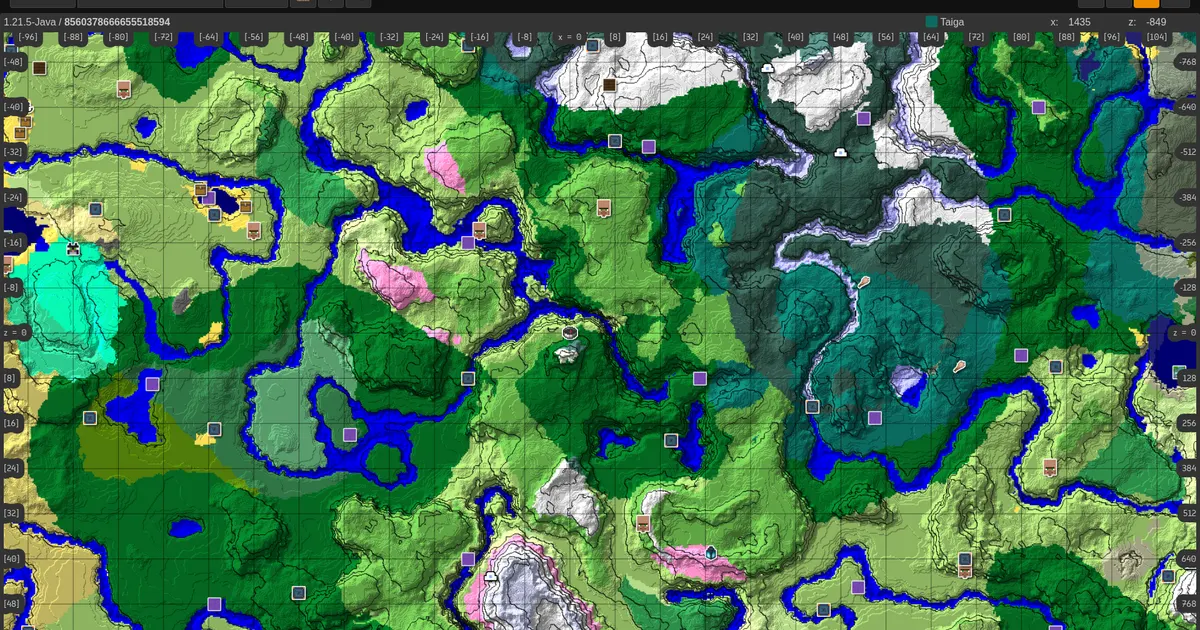
Search for plains, cherry groves, deserts, oceans, islands, mountains, caves, and scenic biome borders.
Check villages, ruined portals, strongholds, trial chambers, ancient cities, monuments, and Nether routes.
Compare coordinates with Minesite seed notes so you know whether the world is worth playing.
Fast answer
A Minecraft seed map viewer helps you test a seed before spending hours in survival or creative mode. Use Minesite to check what is near spawn, compare Java and Bedrock versions, find important structures, and decide whether the world matches your goal.
What to check first
Use this checklist when judging a new Minecraft seed.
| Goal | What to inspect on the map |
|---|---|
| Survival start | Spawn area, trees, food, village distance, caves, water, and first-night safety. |
| Progression | Village, ruined portal, stronghold route, Nether fortress, trial chamber, and End access. |
| Building | Flat land, rivers, mountains, cherry groves, islands, oceans, and scenic biome borders. |
| Exploration | Ancient cities, monuments, mansions, rare biomes, shipwreck routes, and far travel targets. |
Most seed viewers are useful for raw map output. Minesite adds playable context: curated seed pages, screenshots, coordinates, nearby locations, and route notes. That helps you judge the seed, not only look at it.
Browse the Minecraft seed libraryRelated finders
Start with the full seed map, then move into focused seed collections and guides when you care about one target more than the whole world overview.
Accuracy guide
A seed map is most accurate when the seed, edition, version, and world settings match the world you are checking. Minesite keeps those choices close to the map so you can avoid the most common seed-viewer mistakes.
Choose Java Edition for Java worlds and Bedrock Edition for Bedrock, MCPE, console, or Windows worlds. Modern Java and Bedrock can look similar in major terrain, but structures and small details can still differ.
Minecraft generation changes between versions. If a seed was shared for a different version, the biome layout, structures, or spawn area may not match what you see in-game.
Worlds opened in older versions can keep already-generated chunks. If the map looks wrong, test fresh unexplored areas or create a new copy of the world using the selected version.
Use Minesite to plan Overworld, Nether, and End routes from the same seed workflow. Structure results should always be checked with the edition and version that match your world.
Troubleshooting
If a village, biome, or structure is missing in-game, do not assume the seed is fake immediately. Most mismatches come from settings, version history, or copied seed errors.
Extra spaces, missing minus signs, wrong letters, and copied formatting can change the result. Paste the seed exactly and test again before walking long distances.
A seed from Java may not place every structure the same way on Bedrock. A seed from an older update may also behave differently in a newer Minecraft version.
Some worlds are created with generated structures disabled. In that case, villages, strongholds, monuments, mansions, and other structure markers will not match normal generation.
Terrain already explored in an older version usually stays that way. Check unexplored chunks or a fresh world copy when comparing the seed map to your game.
Minesite workflow
Minesite is built around a practical seed workflow: open the map, inspect the important route, then compare the result with curated seed pages that include screenshots, nearby locations, coordinates, and playstyle notes.
Check the spawn area, food, wood, caves, villages, ruined portals, and safe base zones before you commit to a world. A seed is stronger when useful places connect naturally.
Compare mountains, rivers, oceans, plains, cherry groves, islands, and flat spaces before choosing a base, server spawn, city project, or long-term creative world.
Plan routes through villages, strongholds, Nether fortresses, trial chambers, ancient cities, and End targets before testing the seed in-game.
A basic seed viewer answers where something is. A better seed workflow answers whether it is worth going there. That is the difference Minesite should focus on: the map gives the coordinates, while the seed library adds the human context that helps players choose better worlds.
When judging a seed, compare clusters instead of single markers. A village near a ruined portal, good caves, and safe terrain is usually more useful than one rare structure thousands of blocks away. A scenic biome also becomes more valuable when it has wood, water, stone, and travel routes nearby.
Find the seed in your world settings, use /seed on Java worlds where you have permission, or open your save's level.dat file in tools that support local imports.
Common Java save locations
Open the world folder, then look for level.dat.
| OS | Default saves path |
|---|---|
| Windows | %appdata%\.minecraft\saves\WorldName\ |
| macOS | ~/Library/Application Support/minecraft/saves/WorldName/ |
| Linux | ~/.minecraft/saves/WorldName/ |
For your own Java world, use the in-game /seed command if cheats or operator permissions are available. For Bedrock, check world settings. For servers and Realms you do not own, ask the owner.
Short answers for players using a seed map, seed finder, biome finder, or structure finder.
A Minecraft seed map viewer turns a world seed into a visual map so you can check biomes, structures, coordinates, and routes before exploring in-game.
Yes. Use the map as a structure finder for major targets such as villages, strongholds, trial chambers, ancient cities, monuments, mansions, ruined portals, Nether fortresses, bastions, and End cities.
Not always. Java and Bedrock can share similar large terrain shapes in modern versions, but structures, spawn behavior, vegetation, and smaller details may differ. Always choose the edition that matches your world.
The common causes are a mistyped seed, wrong edition, wrong Minecraft version, disabled structures, or chunks that were generated earlier in a different version.
On Java Edition, use /seed if you have permission. On Bedrock Edition, check the world settings. For servers and Realms you do not control, ask the owner for the seed.
Minesite connects the seed map with curated seed pages, screenshots, coordinates, nearby locations, and route notes. The goal is to help you judge the world, not only display markers.
No. Minesite runs in your browser. Enter a seed, choose an edition and version, and open the seed map without installing an app or creating an account.
Seed map guide
A seed map is most useful when it helps you make decisions. Use it to compare spawn, terrain, food, wood, structures, travel distance, and base-building potential before you create a long-term world or share a seed with friends.
Look for trees, animals, village food, water, caves, and safe terrain. A strong seed does not need every rare structure at spawn, but it should give you a playable first route.
A village, portal, cave system, and useful biome close together can be more valuable than one dramatic feature far away. Clusters make survival routes faster and easier to explain.
A speedrun seed, building seed, survival seed, and exploration seed should be judged differently. Use the map layers that match your goal instead of chasing every marker.
For survival, write a simple route: spawn, village, food, cave or lava source, Nether entry, fortress or bastion, stronghold, and End route. For building, focus on biome shape, water access, flat land, mountains, rivers, and the view from the base area.
For multiplayer servers and Realms, the seed map helps the group agree on routes before players spread in random directions. Pick a starter village, a farming area, a mining area, a Nether portal hub, and a few exploration targets without spoiling every location.
For seed publishing, combine the map result with screenshots and coordinates. A good seed page should explain what is near spawn, which edition and version were tested, which structures are worth visiting, and what kind of player the seed fits best.
Curated seed routes
After checking a map, use Minesite seed collections to find worlds that already have tested locations, screenshots, nearby structures, and copy-friendly route ideas.
Use the seed map to check villages, farms, food, trades, caves, and first-night safety, then compare the result with curated village and survival seed pages.
Look for cherry groves, islands, badlands, deserts, mountains, ocean starts, and unusual biome borders that make a world more memorable.
Plan around strongholds, trial chambers, ancient cities, monuments, mansions, portals, fortresses, and End cities when progression or exploration matters most.
When playing on MCPE, console, or Windows, use Bedrock-labeled seed pages and always match the edition before judging structure locations.